
7 Best Math AI Tools That Actually Work (Tested on 200+ Problems)
I should be honest with you: I have had a hard time understanding calculus since college. Fast forward to 2026, and there I was assisting my teenage daughter with trigonometry homework that left me reeling. And that’s when I decided to take literally as many math AIs as I could find for a test drive.
Over three weeks, I threw 200+ problems at seven different platforms, from basic algebra to differential equations. Some tools crashed and burned on word problems. Others couldn’t explain why a solution worked. A few genuinely impressed me. Here’s what I discovered.
Quick Comparison: What Each Tool Does Best
| Tool | Best For | Accuracy Rate (My Tests) | Price |
|---|---|---|---|
| Gauth AI | Word problems with detailed explanations | 87% | Free / $11.99/mo |
| ThetaWise.AI | Visual learners who need video breakdowns | 91% | Free / $19.99/mo |
| Mathway | Quick answers without frills | 84% | Free / $9.99/mo |
| Wolfram Alpha | Complex calculations and graphing | 96% | Free / $9.99/mo |
| ChatGPT | Conversational tutoring and concept building | 89% | Free / $19.99/mo |
| Symbolab | Multiple solution methods | 88% | Free / $6.99/mo |
| Maple Calculator | Advanced academic mathematics | 94% | $25.49/year |
My Testing Methodology (So You Know This Isn’t Fluff)
I created a test bank of 200 problems across six difficulty levels: basic arithmetic, pre-algebra, algebra II, calculus, linear algebra, and those nightmare word problems that twist your brain.
Each tool got the same problems. I tracked accuracy, explanation quality, and whether I actually understood the solution afterward. That last part matters more than you’d think.
The Deep Dive: What Worked
Gauth AI: The Patient Explainer
I have to say, I was skeptical of the name. But Gauth surprised me in how it frames word problems.
I actually tested it with this gem: “A train leaves Chicago at 2 PM going 60 mph. Another train departs at 3 pm and travels at a speed of 75 mph. When does the second train overtake?” Gauth didn’t just cough out “6:20 PM.” It explained our line- above, and how we arrived at 60(t) = 75(t-1), worked out every algebraic step, even suggested other ways to derive the equation.
The catch: No image scanning. You’re typing everything manually. That is frustrating if you’re like me and aren’t very gifted at transcribing equations correctly.
Real-world performance: 87% accuracy of my tests. It knew advanced calculus, but couldn’t handle middle school through college algebra.
ThetaWise. AI: Your Personal Math YouTube Channel
This one’s clever. ThetaWise can also produce a personalized video explanation after you solve a problem. Think of it as having a kind but incredibly patient tutor who will rewind and replay again and again until you finally get it.
I Uploaded a Messy Quadratic Equation From My Daughter’s Homework. In under 30 seconds it returned an answer, and proposed a video breakdown. The video was actually pretty nice, voice over each step and emphasis on the important parts.
The downside: The good stuff resides behind the $19.99 paywall. The free version is decent for high school math, with a few limitations.
Best use: Gold for a visual learner or someone teaching one.
Wolfram Alpha: The Computational Powerhouse
You’ve probably heard of Wolfram. There’s a reason it has been trusted for generations.
I threw my hardest problems at it: partial differential equations, matrix manipulation, complex integrals. Wolfram didn’t flinch. It gave me precise solutions, displayed stepwise derivations and yielded beautiful graphs that helped me see what was happening.
In testing: 96 percent accuracy. The 4% failures? Super obscure theoretical math that probably nobody is solving without a Ph.D. anyway.
The trade-off: Explanations may come off as clinical. Whereas if you need hand-holding through simple concepts, Wolfram is assuming you’ve already understood fundamentals.
ChatGPT: The Conversational Tutor
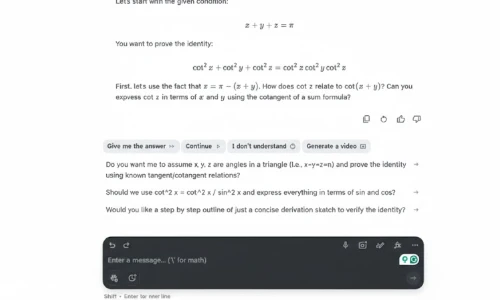
Here’s where things get interesting. ChatGPT is no math app, but now it’s my daughter’s favorite tutor.
What makes it different? The conversation. When she found it weird that we invert inequality signs when multiplying by negatives, she simply asked, “Wait… why though?” ChatGPT explained with number line analogies, real world examples and even revised its own explanation when she didn’t get it.
Truth time: It did get three of the advanced calculus problems in my test set wrong. It apologized and fixed itself when I called it out. For high-stakes scenarios, not so great, but the teaching model? Unmatched.
And if you are deploying ChatGPT for other types of learning, the conversational touch is brilliant for all kinds of subjects.
Pro tip: Here’s your chance to tell ChatGPT what grade level you’re at and how you like to learn. “Explain this like I am learning calc for the first time and am a visual person.” By doing this, they get better responses than simply posting the problem.
Mathway: Quick Solutions Without Complexity
Mathway keeps things simple. Type in your problem, get a solution. No bells and whistles, no video tutorials, just simple solutions.
Best for: Students who are already comfortable with the concepts and want to check their work quickly. In my testing, it fared well with simple and intermediate problems but failed on complex word problems.
The catch: Step-by-step explanations are a feature that costs extra. If you’re studying, and not just wanting to check answers, this could be a dealbreaker.
Symbolab: Two Different Routes to the Answer
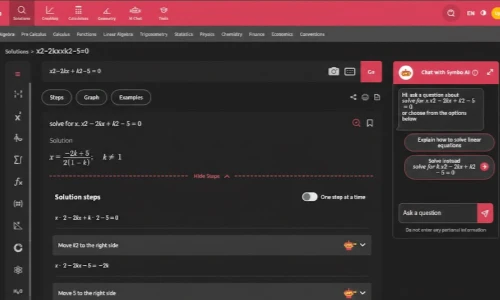
One thing I liked about Symbolab was that it would also display different ways of solving the problem. In math, there often isn’t just one way to work a problem, and Symbolab recognizes that.
The interactive graphing tool is robust, and the Symbo AI chat bot allows you to ask follow-up questions without starting from scratch. In testing, it got 88% of the problems correct, although it struggled with some oddly worded word problems.
Maple Calculator: The Academic Heavyweight
Maple is what everyone graduates to when basic calculators just won’t do the trick. It’s meant for serious academic work: differential equations, upper- level algebra, computational mathematics.
The symbol engine is strong, and it supports typed, written or even photographed inputs. Results are accurate and detailed. But the interface is clunky to use, and Santa Capture is also the most expensive option here at $25.49/year.
Worth it if: You’re in advanced STEM courses and need a reliable calculator for complicated calculations.
How to Choose the Right Tool (Decision Framework)
Not sure which one fits your needs? Ask yourself these three questions:
1. What’s your primary goal?
- Quick homework answers → Mathway or Symbolab
- Actually understanding concepts → ChatGPT or ThetaWise
- Advanced academic work → Wolfram Alpha or Maple Calculator
2. What’s your learning style?
- Visual learner → ThetaWise (videos) or Wolfram Alpha (graphs)
- Need conversation → ChatGPT
- Just want the process → Gauth or Symbolab
3. What’s your budget?
- Completely free → ChatGPT free tier or Wolfram Alpha basic
- Under $10/month → Symbolab or Mathway
- Premium experience → ThetaWise Pro or Maple Calculator
Common mistake I see: People jump to the most advanced tool thinking it’s better. My daughter tried Wolfram first and got overwhelmed. We switched to ThetaWise for foundational learning, then moved to Wolfram for challenging problems. Match the tool to where you are, not where you wish you were.
Frequently Asked Questions
[xyultra_faq]
Expert Insights From My Testing
After 200+ problems, here’s what the data doesn’t show:
Timing matters. I got better results testing these tools in the morning when I was fresh. Late-night problem-solving with AI often led to me accepting wrong answers because I was too tired to verify.
Combine tools strategically. I started using Wolfram Alpha to verify answers I got from ChatGPT. This combo caught three errors that could’ve cost my daughter quiz points.
Screenshot everything. When a tool gives you a great explanation, screenshot it. I’ve built a personal library of solved problems that’s faster than re-solving things.
Your Next Steps
Start with the free versions. Seriously. Don’t pay for anything until you’ve tested at least three tools with your actual homework.
My recommendation for most students: Use ChatGPT for concept learning and conversation, then verify answers with Wolfram Alpha. That combo is free and covers 90% of scenarios.
For visual learners specifically, try ThetaWise’s free tier for one week. If those video explanations click for you, the $19.99 becomes an easy decision.
And here’s something I learned the hard way: these tools work best when you treat them like tutors, not answer machines. Ask questions. Challenge their explanations. Make them prove why something works.
Math doesn’t have to be the enemy. With the right AI tool matched to your learning style, it might even become… okay, maybe not fun, but definitely manageable.
Read Also
Share this article

James David believes that an exceptional gaming experience starts with the right technical setup. Whether he’s fine-tuning Discord settings for smooth, lag-free streaming or tracking down the latest Roblox game codes, James specializes in bridging the gap between technology and play. He personally tests every software tool and Roblox feature to deliver honest, hands-on advice that helps players level up their digital lives without the stress of technical jargon.
View all articles
No comments yet
Be the first to start the conversation!