
Gaming Chair Buying Guide: What to Look For Before You Buy
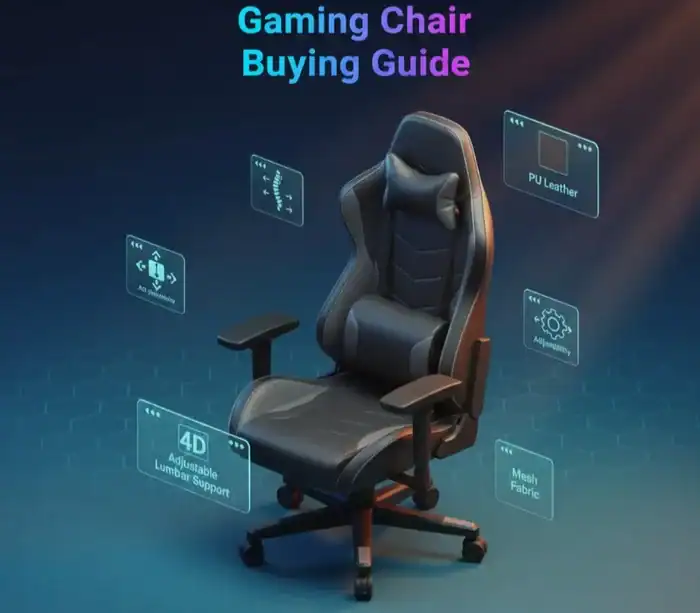
Picking the right gaming chair isn’t just a matter of looking for some flashy design. “Having tested dozens of chairs and spent nearly as much time researching what makes a good chair worth buying, I’ve found that what separates a good chair from a great one can be narrowed to knowing precisely where your money should go.”
Whether you spend 2 hours or 12 hours a day at your computer, gaming chair can impact everything from your posture to the way you play. This guide decodes the key features you need to know about before deciding which one to spend your money on.
Quick Reference: Essential Gaming Chair Features
| Feature | Why It Matters | What to Look For |
|---|---|---|
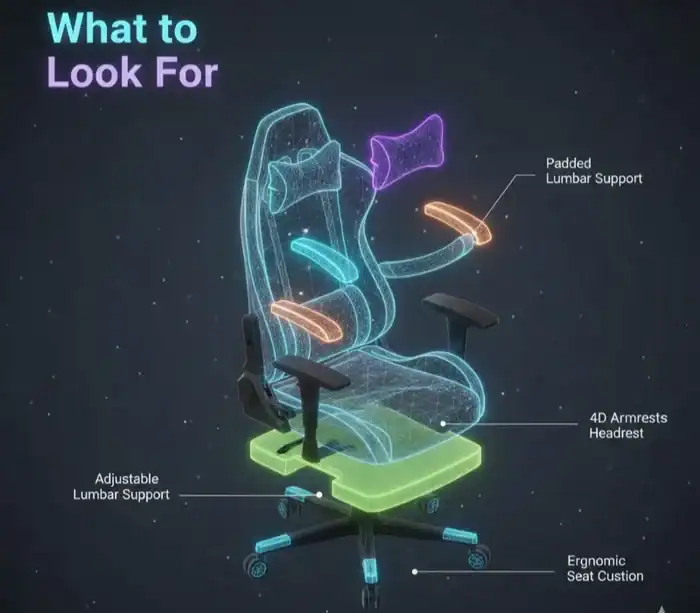
| Lumbar Support | Prevents lower back pain during long sessions | Adjustable height and depth, integrated or pillow-based |
| Armrests | Reduces shoulder and neck strain | 4D adjustability (height, width, angle, depth) |
| Recline Mechanism | Allows position changes and relaxation | 90-165 degree range with tilt lock |
| Material | Affects comfort and temperature | Mesh for cooling, PU leather for durability, fabric for softness |
| Weight Capacity | Ensures chair longevity and safety | Match your weight plus 50-100 lbs buffer |
| Seat Cushioning | Determines long-term comfort | Cold-cure foam or memory foam, medium-firm density |
Why Gaming Chairs Are Different from Office Chairs
I’m asked this question constantly. Gaming chairs and office chairs might share some genes, but they are made for separate purposes.
Gaming chairs usually have a bucket seat style inspired by racing seats, but with taller backs and more extreme side bolsters. The design stems from the mid-2000’s when aftermarket performance companies had already been using racing seat designs as a base for their product line.
Neutral posture and motion are a focus in office chairs as they are meant to be used throughout the day. Gaming chairs throw in extras like deeper recline angles (some go down to 165 degrees), built-in footrests and visual designs that coordinate with gaming set-ups.
The best contemporary gaming chairs are a different story. (Now brands like Herman Miller and Secretlab are designing chairs that pull double duty in gaming marathons and 9-to-5 work sessions.)
Ergonomics: The Most Important Feature You Can’t Ignore
Let me be direct about this. If a chair doesn’t support your body properly, nothing else matters. I’ve tested chairs that looked amazing but left me with back pain after just 3 hours.
Lumbar Support Is Non-Negotiable
Your lower back does have a natural curve, known as lumbar lordosis, which usually is between 20-45 degrees. This curve needs to be supported in a good gaming chair, not fought against.
So, I mean, there’s two types of lumbar support. Pillow-based devices rely on a cushion that you nasally orient yourself. These are not great as they move around a lot during longer sessions. Backrest with integrated lumbar support that adjusts internally and does not rotate.
The best chairs will be height- and depth-adjustable for lumbar support. In my testing, chairs such as the Razer Iskur V2 with its 6D adjustable setup and the Secretlab Titan Evo with 4 way support were my best styled personal supporters.
Adjustability Creates the Perfect Fit
We’re all built differently, after all — and adjustability trumps any one feature. Look for these adjustment options:
The seat should be at a height that allows for the feet to be planted flat on the ground, with the knees bent to 90 degrees. Class 4 hydraulic pistons are the most common, and while high-end companies like Herman Miller also use short hydraulics to fit more body types.
Adjustable armrest eliminate shoulder aching and wrist pain. Basic chairs provide height adjustment. Higher-end models offer 4D adjustment (up, down, side to side, tilt angle and forward/backward depth). Your elbows should rest at 90 degrees, and your shoulders relax when positioned properly.
Reclining and tilting features allow you to switch sitting postures throughout your day. Movement keeps us from getting stiff and gets the juices flowing. Seek chairs that have continuous tilt mechanisms rather than fixed positions, while also locking into your desired angle.

Understanding Gaming Chair Materials and What They Mean for You
The upholstery material affects how your chair feels, how long it lasts, and how much you’ll sweat during intense gaming sessions.
PU Leather: The Most Common Choice
Polyurethane leather is all over the gaming chair market for a practical and affordable reason. It’s sleek in looks, resists spills and stains, and wipes clean easily. The downside is heat retention. In summer, or in warm rooms, PU leather gets rather unpleasant during marathon sessions.
High-end chairs such as those from Secretlab are made using advanced EPU (enhanced polyurethane) with cooling properties to minimize heat retention.
Fabric: Soft and Breathable
Fabric upholstery is not only comfortable for your body, but when it comes to summer’s wet bathing suits or winter’s snowy boots, the s holds up to the seasons. If you live in a warm part of the country, or get particularly toasty when you sleep, fabric is something to think about. The trade-off is that fabric stains more readily and shows wear sooner than leather alternatives.
Treatments of fabric that repel water will help against spills, but you’re still going to want to be more cautious than with PU leather.
Mesh: Maximum Cooling
Fabric gaming chairs keep you the coolest. The material allows air to travel between the glove and your skin, keeping you cool during heavy sessions. Herman Miller’s Aeron gaming chair and newer options like the Razer Fujin show that mesh can work for gaming.
The downside is that mesh chairs often cost a little more and don’t have the look of being designed specifically for aggressive gaming that some players might crave.
Cushioning and Foam Density: Why Firmness Matters
Here’s something most buying guides gloss over. What’s inside your chair counts as much as what covers it.
(On the cheap chairs you get basic polyurethane foam that compresses and loses its shape after a few months.) Hit the seat Laying low on the toilet makes you play dirty: You’re pressing your pelvic area against an unclean surface (hello, bacteria).
Good gaming chairs have cushions made of cold-cure foam or high quality memory foam. These materials hold their shape better and help the mattress distribute your weight more evenly. Most will want medium-firm density, which gives enough support to eliminate sink without feeling stiff.
Some chairs include two foam layers. A softer top layer for quick comfort and a firmer bottom layer to prevent the bed from bottoming out over time.
Matching Chair Size to Your Body Type
This is where a lot of folks go wrong, in costly fashion. There’s a reason why gaming chairs come in different sizes, but marketing photos don’t show you that.
Small, regular and XL sizes are generally available from most brands. The regular version of the Secretlab Titan Evo, for example, is scaled appropriate for those within 5’7” to 6’2”, while XL scales up for someone even taller at 6’9” and no more than 395 pounds.
Read the manufacturer’s size chart, and give your measurements honestly. A chair that’s too small can make you feel squished and limit your range of motion. Too big a chair will not support you as it should because your back isn’t going to contact the lumbar area as intended.
Weight capacity is something that affects how long your ladder will last, not just how safe it is. When you weigh 200 pounds, consider chairs rated to hold at least 275-300 pounds. This buffer allows the chair’s mechanisms and padding to last longer.

Budget Considerations: Where to Spend and Where to Save
Gaming chairs range from $150 to over $1,500. I’ve tested both ends of this spectrum, and there are smart ways to balance cost and quality.
Budget Tier ($150-$300)
Chairs in this range make compromises. You’ll typically get pillow-based lumbar support, basic 2D armrests, PU leather upholstery, and standard foam cushioning. Brands like GTRacing and Homall dominate this space.
These chairs work fine for casual gamers who play 1-2 hours daily. Don’t expect them to last more than 2-3 years with regular use.
Mid-Range ($300-$600)
This is the sweet spot for most gamers. You’ll find integrated lumbar support, 4D armrests, better foam quality, and improved build quality. The Razer Iskur V2 X and mid-tier Secretlab models live here.
Expect 4-5 years of solid performance with proper care.
Premium ($600-$1,500)
Premium chairs justify their cost through superior ergonomics, extended warranties (Herman Miller offers 12 years), and materials that actually improve over time. The Herman Miller Embody, Secretlab Titan Evo, and Razer Iskur V2 represent this category.
If you work from home and game seriously, treating this as a long-term investment makes sense.
Common Mistakes to Avoid When Buying a Gaming Chair
I’ve been guilty of most of these myself, so read and save yourself some costly mistakes.
Don’t purchase based purely on looks. That muscled racing look might seem great in photos, but if it doesn’t suit your body or support your back, within days you will regret it.
Don’t ignore the warranty. A 1-year warranty on a $400 chair is not very assuring. Respectable manufacturers warranty their items for a minimum of 3 to 5 years, premium brands boast as much as 12 years.
Don’t assume bigger is better. The same oversized chairs may feel better at first, by you are being pushed into a position that promotes poor body alignment and it will eventually hurt.
Don’t skimp on assembly. (Slow down, read the instructions, and don’t over tighten bolts.) I’ve observe people even fuck up brand new chairs putting them together too quickly.
Testing a Chair Before You Buy
Try to test a chair in your space before committing. Consider visiting a store like Micro Center or authorized retailers to sit in floor models.
During testing, here are things to look for:
Are you able to sit with both your feet flat, and your back supported? If you are forced to pick one, it’s the chair that does not match up with your body type.
Are the armrests at a height where your elbows are in an angle that feels natural and not tense from having to raise your shoulders? If the armrests are not adjusted tall enough they cause tension headaches and pain in the neck.
Is it simple to get to controls while sitting? You won’t use them often if you have to stand up or reach to get to controls.
What is the chair like after 15-20 minutes into it? The comfort we find at first isn’t always the same as long-term comfort. Try to remain seated if you can, for at least 15 minutes.
Setting Up Your Gaming Chair Correctly
The hardest part is just finding the right chair. As long as it is set up properly, the ergonomics will be in your favor.
Start with seat height. Tune until your feet sit flat with knees at 90 degrees. And your thighs should be parallel to the floor.
Place back support along the small of your back, usually 1-2 inches from the belt line. You want to feel supported, but not too much pressure or it should provide support underneath your natural curve.
Set armrests so elbows are at 90 degrees with shoulders relaxed. Boom, your arms are cocked and ready to rock whether you’re wailing on a controller or swiping at keyboards and mice.
Adjust and lock in your perfect recline Set your own recline to fit your body, Use the Recline tension Adjustment to match the resistance of your body. It should hold you up straight without depending on constant muscular effort, yet also recline easily when you want to kick back.
Maintaining Your Gaming Chair for Maximum Lifespan
Proper maintenance extends your chair’s life significantly. I’ve had chairs last 7+ years with basic care.
Vacuum fabric and mesh chairs monthly to prevent dust buildup. For PU leather, wipe down weekly with a slightly damp cloth. Avoid harsh chemicals that break down the material.
Tighten bolts every 3-6 months. The constant movement and weight distribution gradually loosens connections. A quick check with the included Allen key takes 5 minutes.
Replace damaged or worn casters immediately. Broken wheels stress the wheelbase and can damage floors. Most chairs use standard 60mm or 65mm casters that cost $15-30 for a full set.
Frequently Asked Questions
[xyultra_faq]
Making Your Final Decision
Finding the best gaming chair is less of a challenge than it used to be, but there’s still plenty out there. When hunting down your perfect seat, you can often find yourself paralyzed by choice or struggling to know what separates one chair from another outside fancy branding and huge price tags.
If you’re on a budget and only game casually, a $200-300 chair with rudimentary lumbar support and good ratings does the trick. Brands with a minimum 2-year warranty are a good place to start your search.
If you’re a gamer or work from home: You can spend $400-600 on a mid-range desk chair with integrated lumbar support and 4D armrests, but enjoy improved comfort and longer lifespan.
On the next level it’s things like premium chairs from Herman Miller, Secretlab and Razer, which offer additional features and build quality that can justify their extra cost over 5-10 years.
And, of course, the most expensive chair isn’t necessarily the one that will be best for you. The best gaming chair is a matter of personal preference — and, ultimately, your priorities: Where will you be using it? Do your homework, try things out when you can and buy from reputable brands with solid warranties.
Your body will thank you with every gamer session or work break. That’s worth getting right.
Read Also
Looking to complete your gaming setup? Check out these related guides:
Best Gaming Controller for PC and Mobile
Best Gaming Laptops Under $1500
Steam Deck Setup Guide
Game Bar Windows 11 Setup and Recording
OBS Studio Game Recording Tutorial
Free Video Editing Apps for Gaming
Share this article

Aisha is a dedicated gaming contributor who spends her time tracking down the latest digital treasures. She believes every player deserves a head start, which is why she personally verifies every active game code and reward guide before it reaches the community. From Pet Capture Adventure to hidden fishing mechanics, Alma’s goal is to ensure that gamers always have access to reliable bonuses that genuinely enhance their gameplay experience.
View all articles
No comments yet
Be the first to start the conversation!